Terrain-aware. Bend-compliant. Cross-slope aware. Equipment slope limits enforced. One run.
PipeGrade Pro reads your terrain, enforces your pipe spec, resolves bend limits, redistributes slope for equipment access, and writes a fully compliant profile back to Civil 3D. No manual PVI placement. No iteration. No variation between designers.
GLD Tools is organized around the workflows pipeline engineers actually do, not internal module names. Each suite targets a distinct delivery phase, so your team adopts only what they need, and scales into the rest.
FLAGSHIP
Pipeline Grading & Profile Automation
LIVE
Cross Sections, Volumes, Excel/HTML Exports
BETA
Spoil Grading, Slope Takeoff, Corridor Automation
BETA
Compliance Reports, Client Submittals, Construction Packages
Every pipeline engineer knows the cycle. Move a PVI, check the bend limits, adjust the profile, recheck cover, repeat. For every alignment. On every project. All to produce a single compliant Civil 3D profile.
PipeGrade Pro mirrors the reasoning of a senior pipeline designer. It doesn't just offset a profile. It solves terrain, bends, hot bends, slope, physical pipe validity, and excavation in one closed-loop pass.
This is not a profile offset tool. It is not a smoothing pass on an existing grade. It builds the profile from terrain up, enforces every constraint simultaneously, and produces a result you can issue, not one you have to undo.
Select your alignment, pipe spec, and optimization mode. The engine handles the rest.
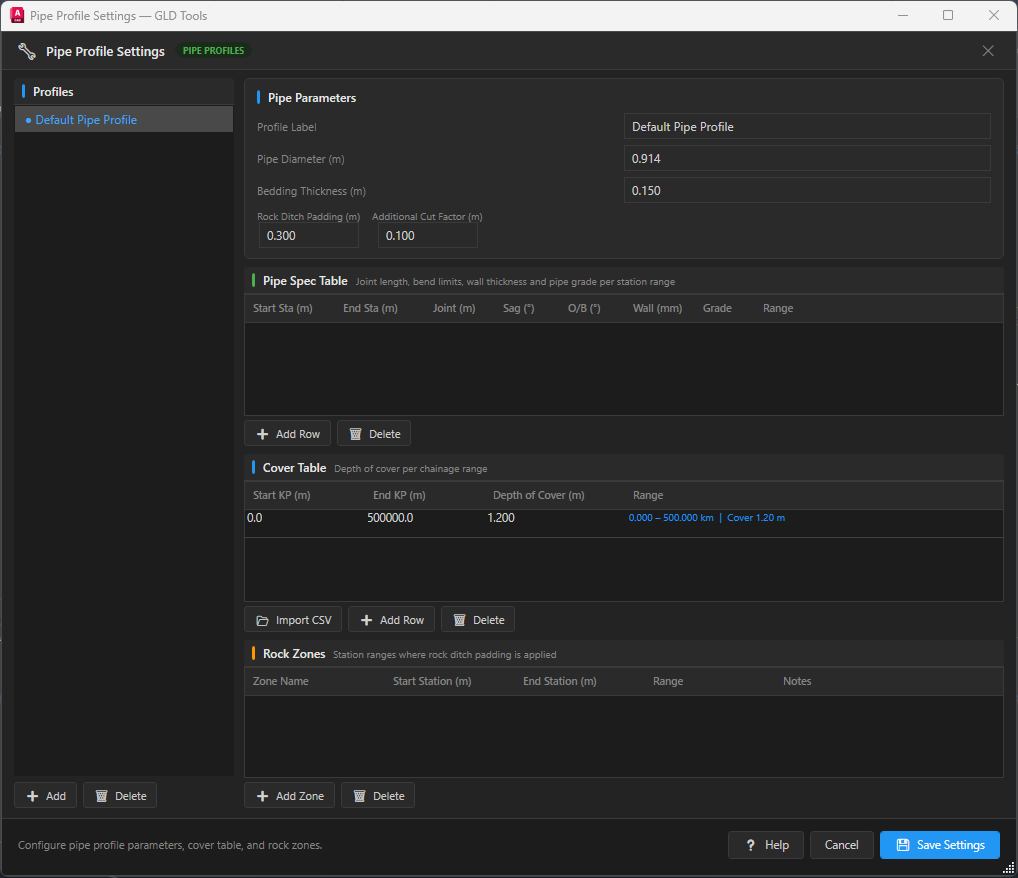
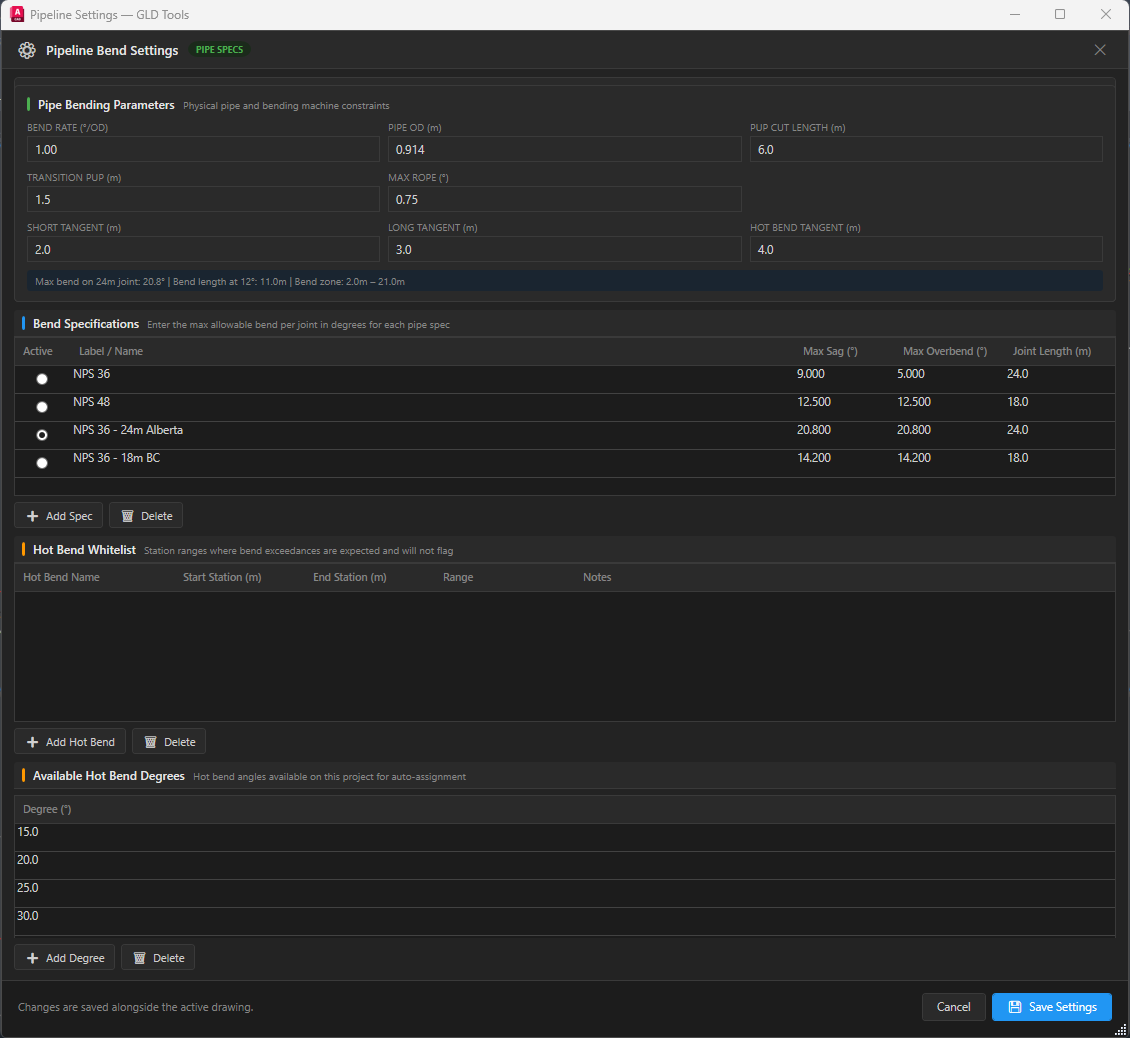
Pick the alignment, offset profiles, pipe spec, cover table, and optimization mode. Toggle hot bend whitelist and joint model if needed.
The six-layer engine samples terrain, enforces constraints, resolves violations, redistributes slope, and polishes the profile. Fully automatic.
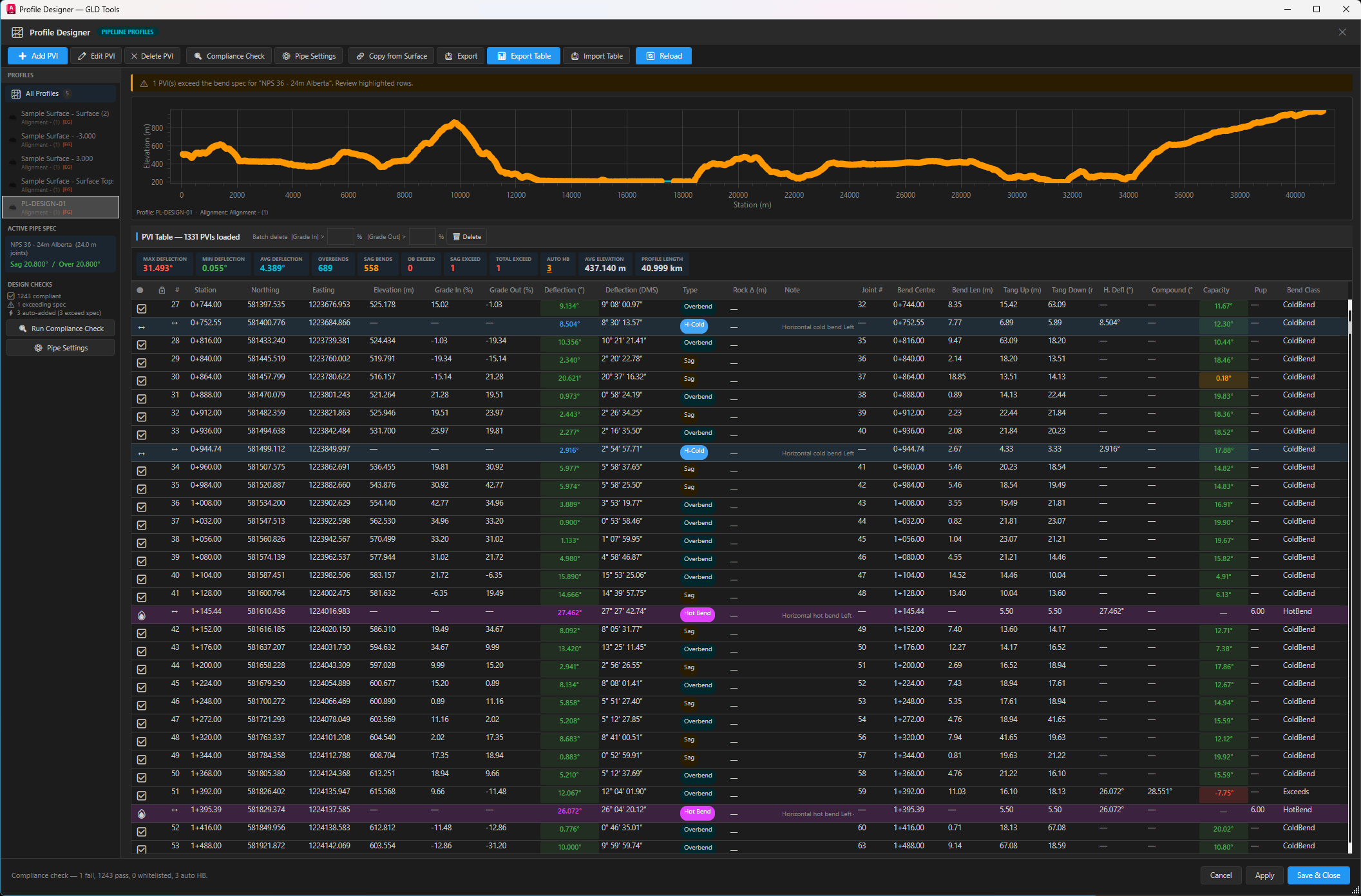
Open the result in the Profile Designer. Full PVI table, compliance status, profile chart, and hot bend locations, all in one view.
Write the profile to Civil 3D. Export to Excel, HTML, LandXML, or 3D shapefile. Generate the Grade Report for QA sign-off and client submission.
Every project has different priorities. PipeGrade Pro lets you choose the optimization strategy that matches your engineering requirements.
Applies the minimum PVI corrections needed to satisfy bend limits. Produces a compliant profile that stays close to the original PVI positions.
Keeps the profile as high as possible within cover constraints. Uses conservative corrections and asymmetric lowering to minimise total excavation volume.
Produces the smoothest possible grade line by minimising total deflection across all PVIs. Reduces bend severity through progressive flattening, prioritising a consistent grade.
Generates a profile with the fewest possible PVI points while maintaining cover and bend compliance. Simplifies construction layout and reduces field survey effort.
PipeGrade Pro enforces real-world pipeline construction rules that generic Civil 3D tools don't know about.
Samples at actual joint intervals from your pipe spec table, not arbitrary station increments.
Separate sag and overbend deflection limits checked at every PVI against your specification.
Surface-aware cover depth enforcement at every station, not just at PVI points.
Station-range cover tables with pipe diameter, bedding thickness, and additional cut factors.
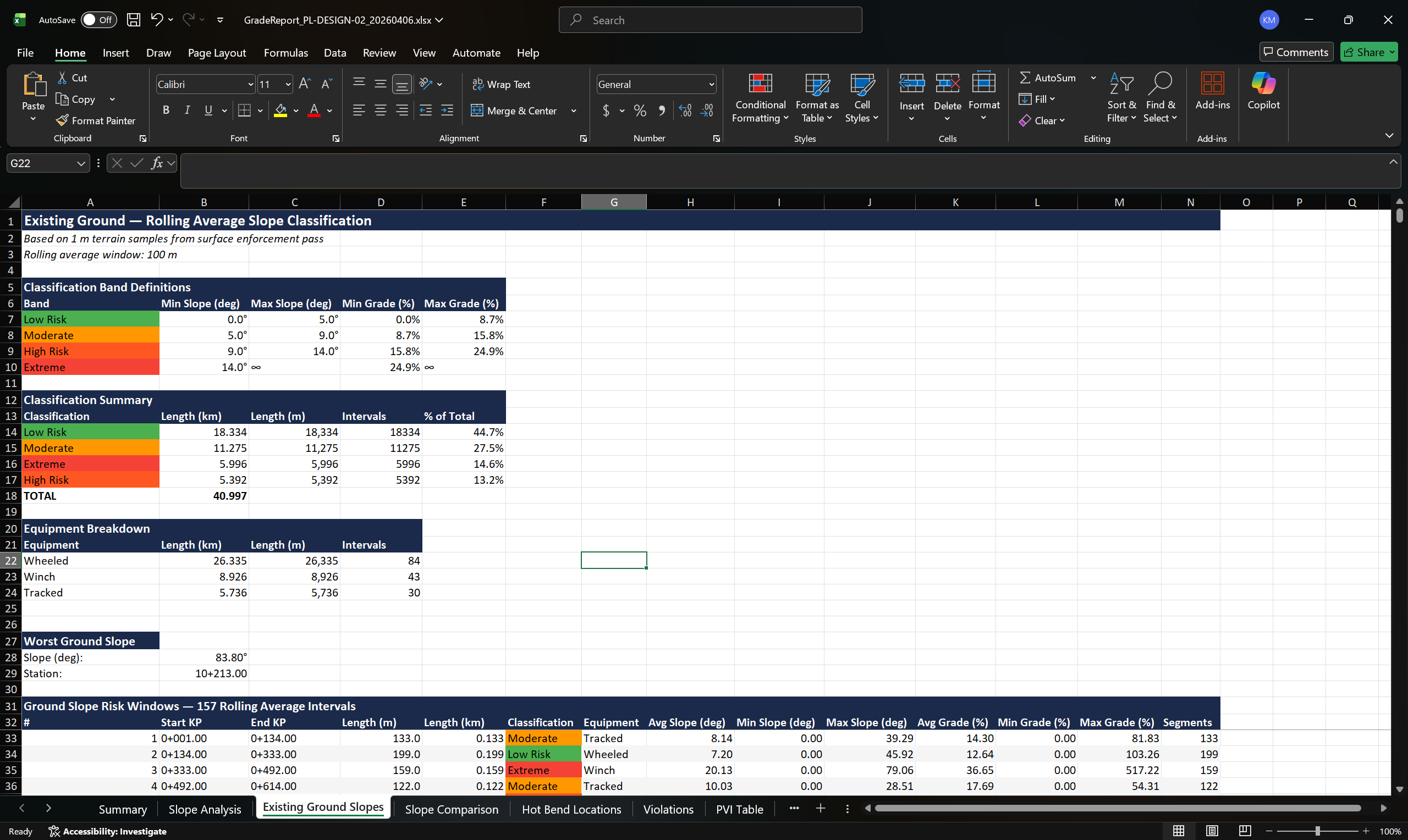
Samples the left bank, right bank, and existing ground independently. The pipe is always placed below the controlling low side, not just the centreline.
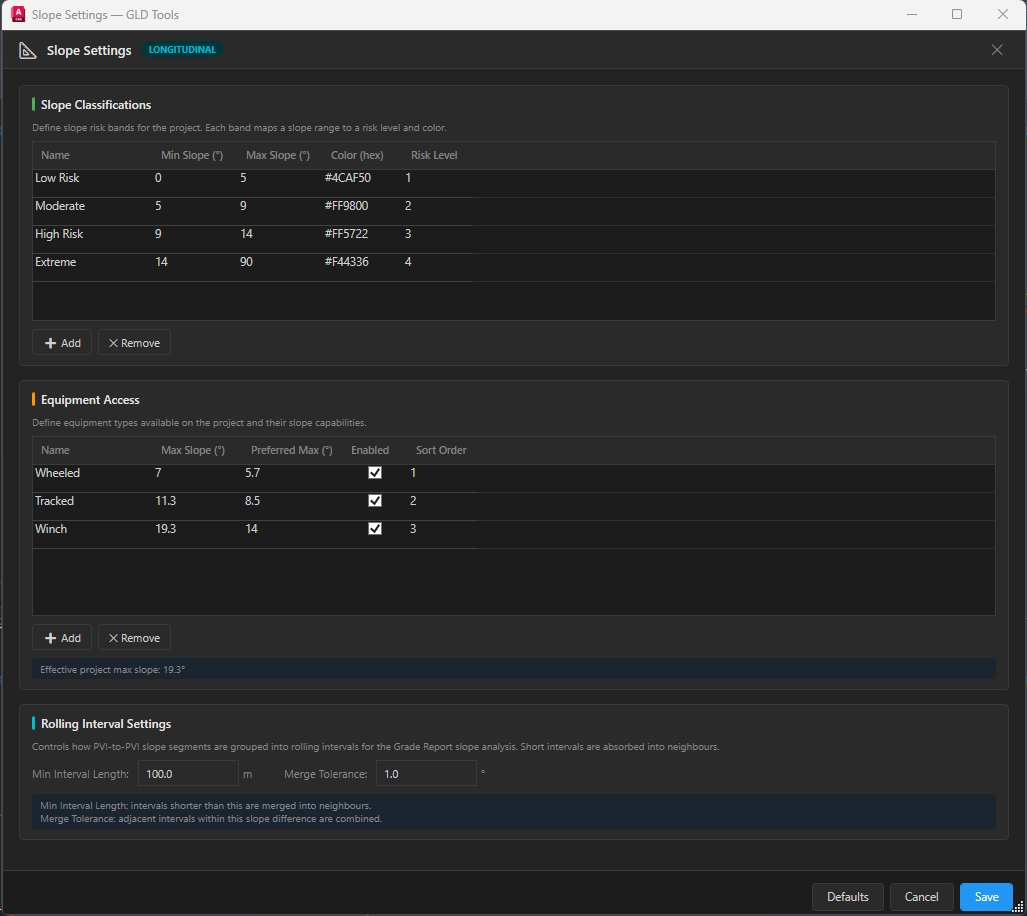
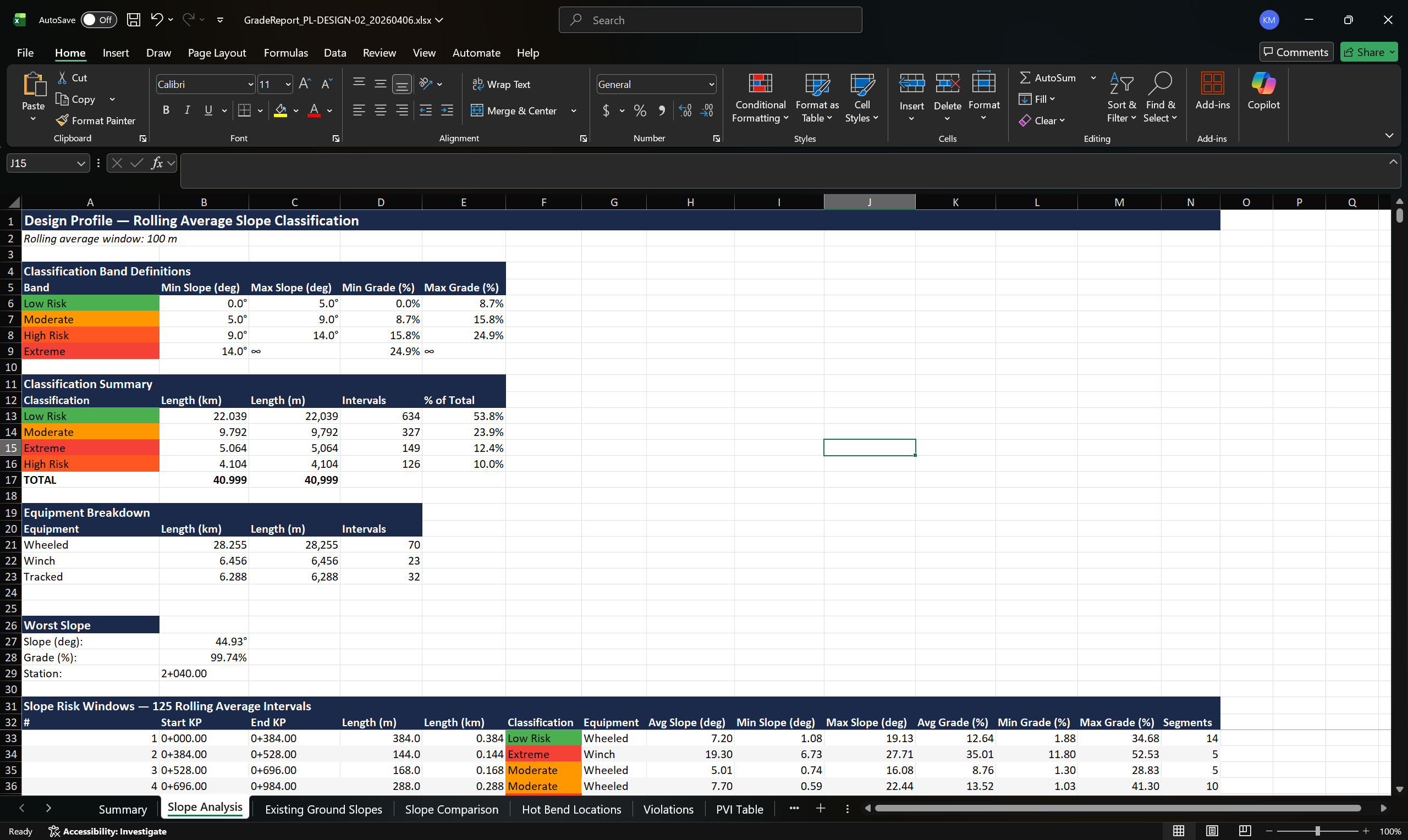
Define wheeled, tracked, and winch equipment classes with separate max and preferred slope thresholds. The engine targets preferred and enforces max, with a redistribution pass that flags segments requiring special equipment.
Specify required hot bend locations before running the engine. Client-specified bends at creek crossings, steep terrain, or structural requirements are locked in and excluded from violation flagging. Additional hot bends are auto-assigned from your project's available bend degrees only where the optimizer cannot resolve the violation by grade adjustment.
Every constraint is configurable
From the CAD designer to the PM tracking delivery timelines.
Responsible for producing constructible profiles under constraint. Iterates pipe sizes, bend specs, and cover requirements across dozens of alignments per project.
Accountable for schedule and quality across multiple active corridors. Senior staff are stretched thin. Late-stage rework is the most expensive risk on the project.
Evaluates tools against deployment risk, training cost, and integration overhead. Needs clear ROI tied to measurable schedule and cost reduction.
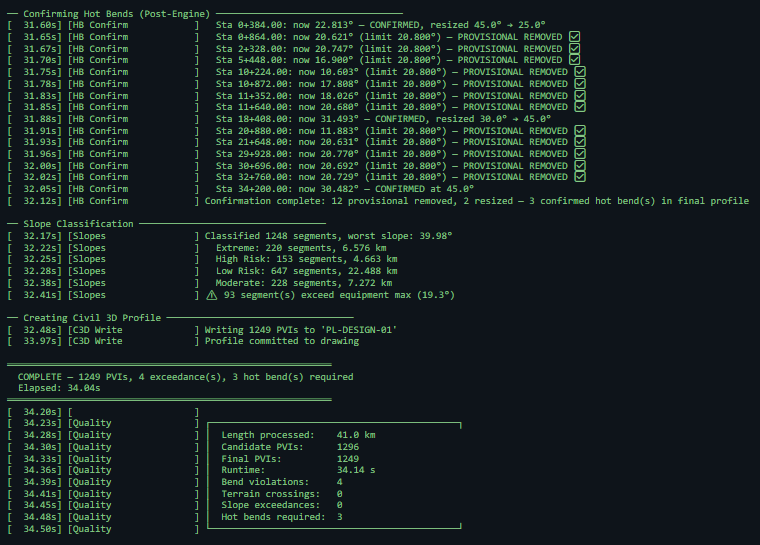
═══ GLD Tools — Auto-Profile Generation Log ═══ ══ Start: 0.0 m End: 40,998.8 m Joint: 24.0 m —— Pass 1: Adaptive Coarse Sampling [ 12.41s] Completed — 1,261 candidate PVIs sampled —— Pass 2: Terrain Ceiling (1 m resolution) [ 22.08s] Completed — 40,998 ceiling samples —— Phase A: Bend Compliance [ 22.24s] Converged after 4 passes [ 22.26s] Pruned 1261 → 1,230 PVIs —— Engine Optimization [ 24.51s] 11 provisional hot bends — all 11 removed via redistribution [ 24.88s] All segments below grade after 25 fix passes [ 25.14s] Polish raised 1,744 PVIs to minimize cut —— Slope Redistribution [ 38.60s] 53 steep segments → 101 improved across 12 passes Exceedances reduced: 53 → 14 —— Hot Bend Confirmation [ 52.11s] 11 provisional removed, 0 resized 1 confirmed hot bend (post-engine sweep) —— FINAL VALIDATION PVIs: 1,230 Violations: 1 Crossings: 0 ✅ Hot bends: 1 COMPLETE — Elapsed: 55.02s
This is a real engine run on a production corridor, not a demo. PipeGrade Pro processed the full alignment, optimized the grade, and wrote the profile to Civil 3D in a single run.
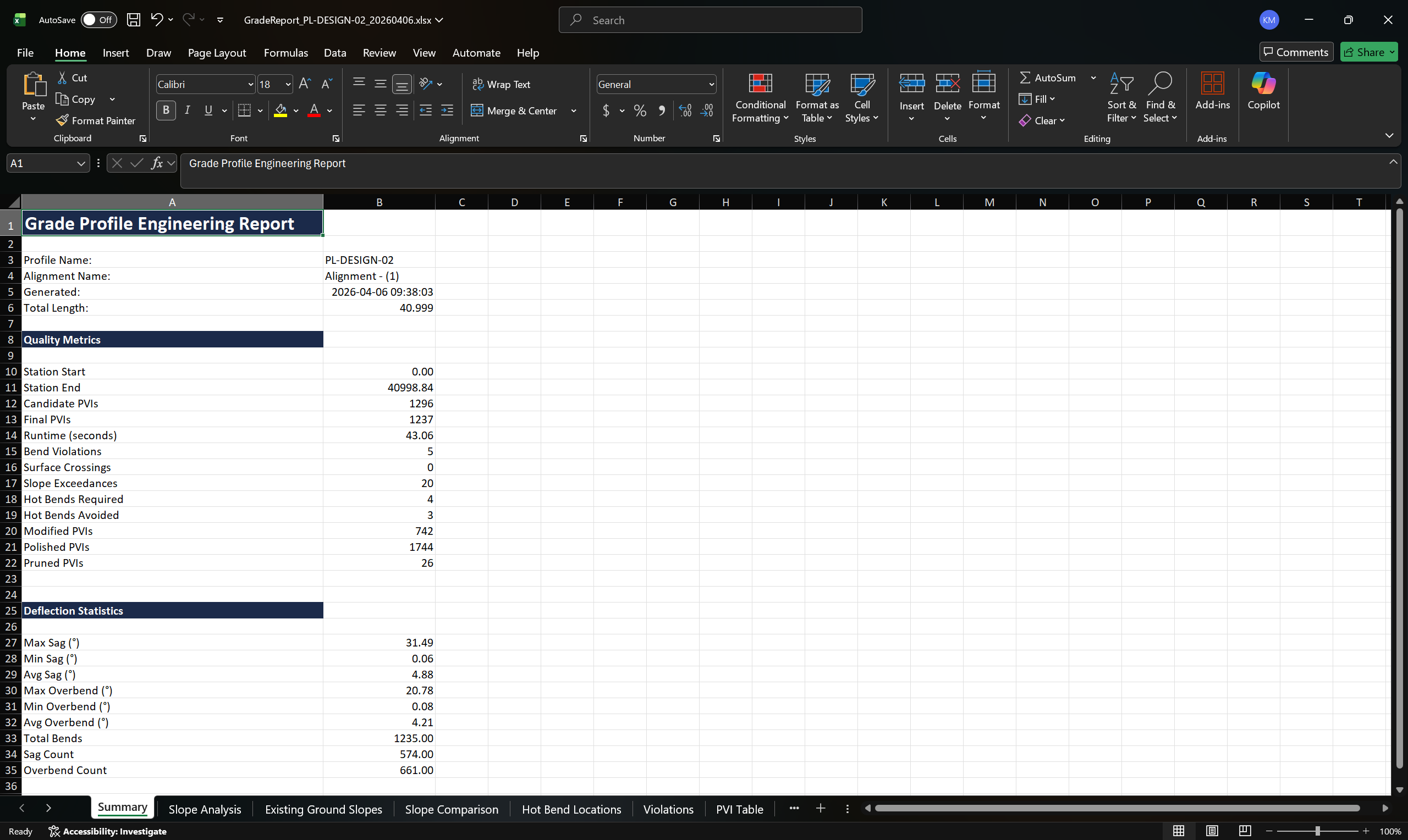
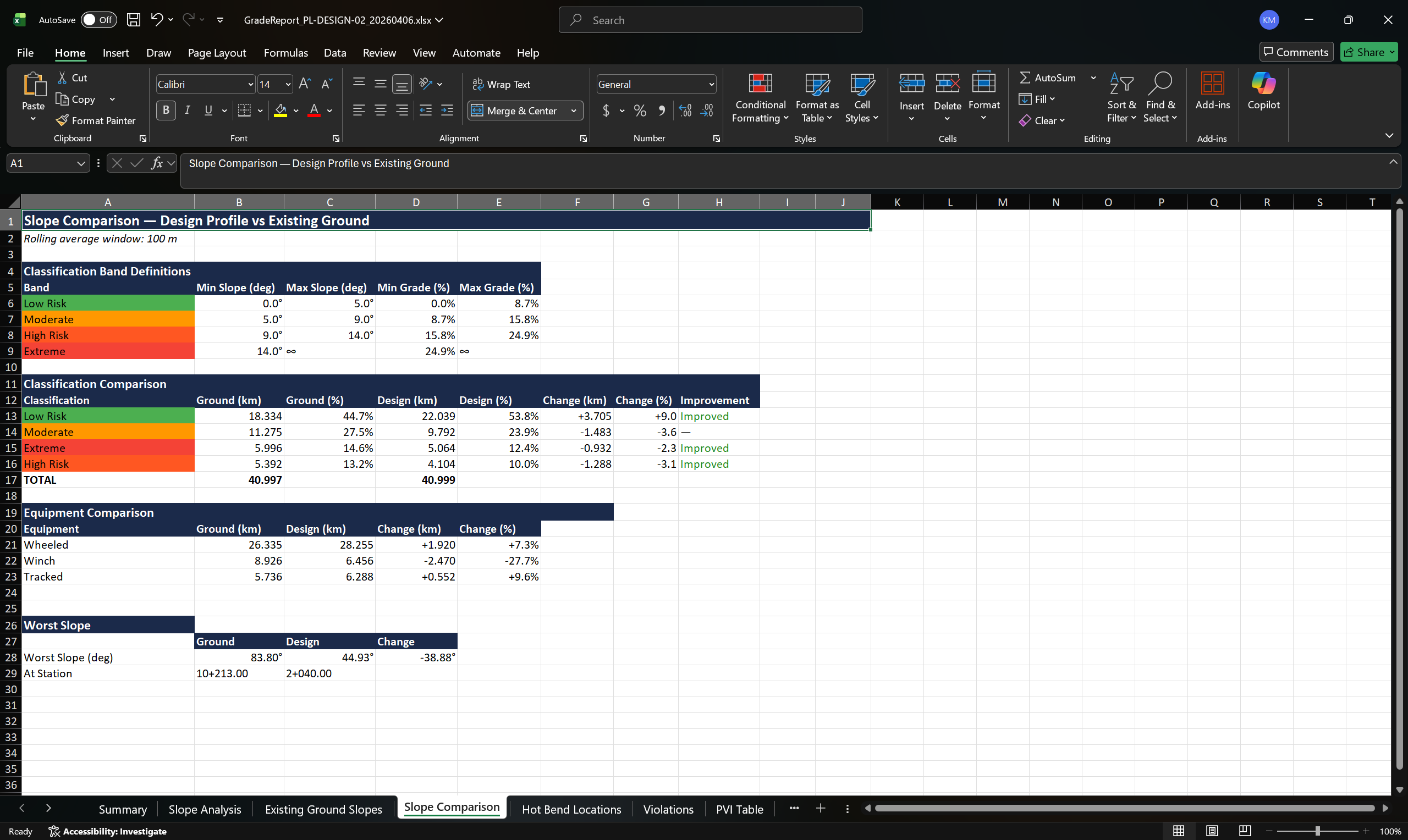
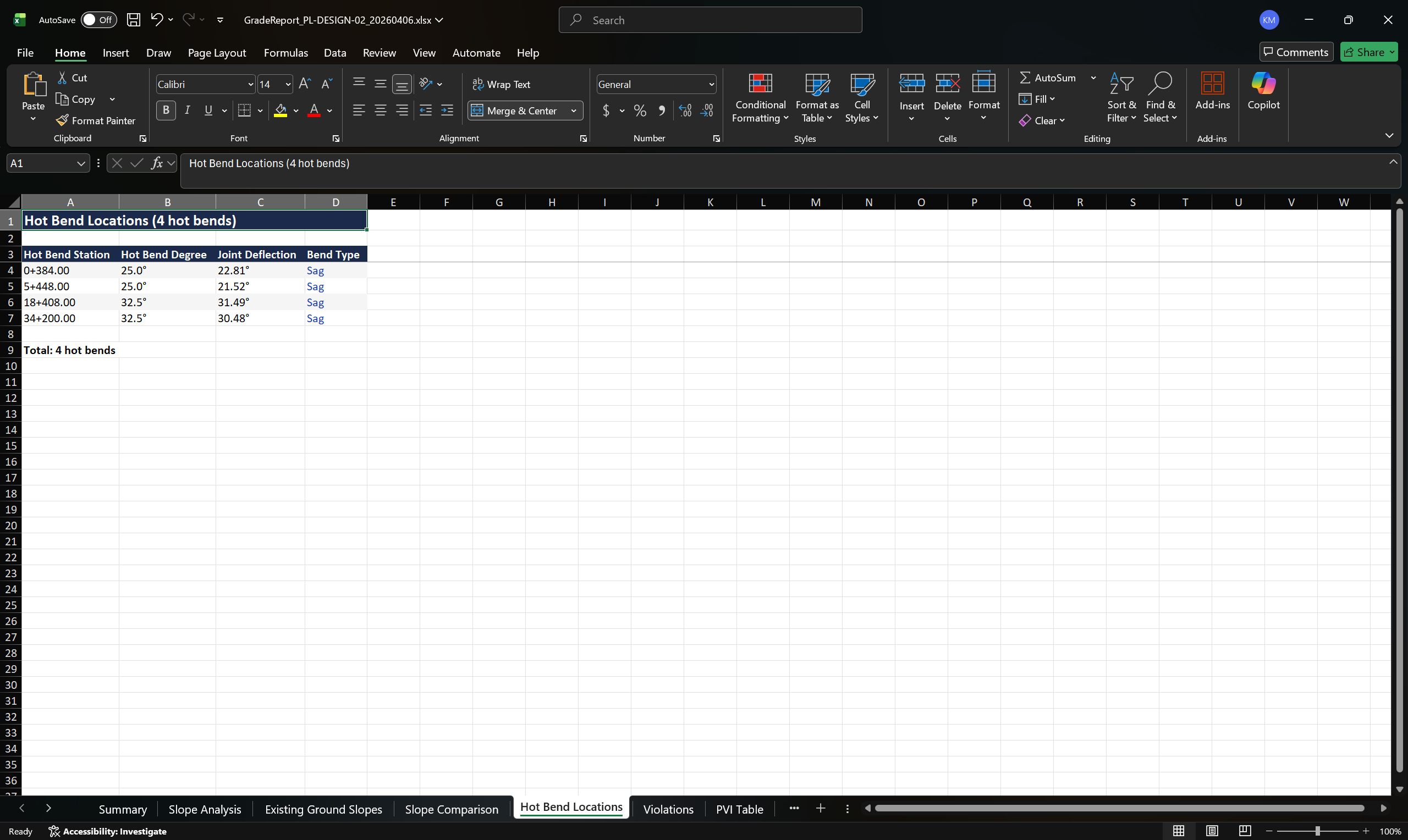
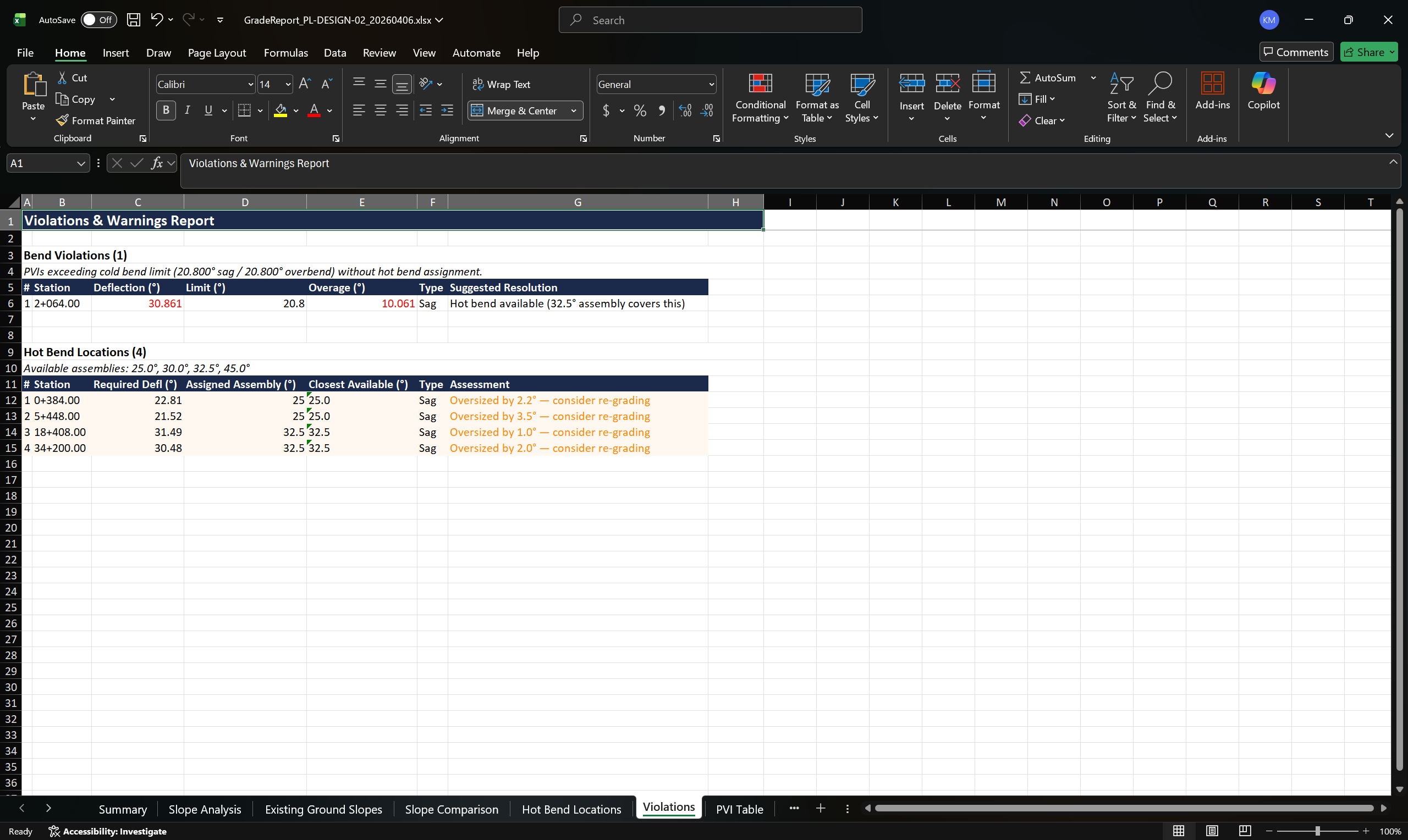
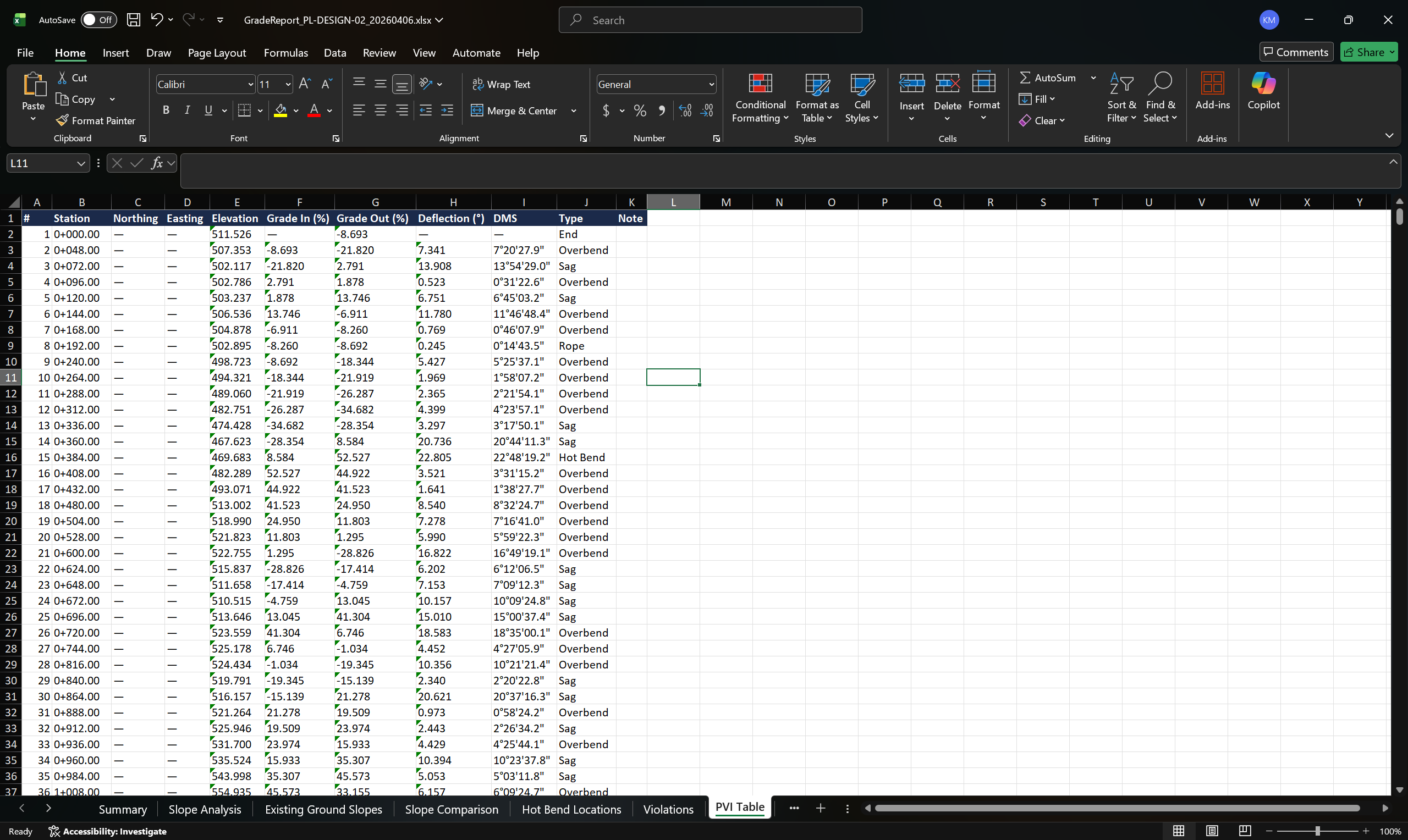
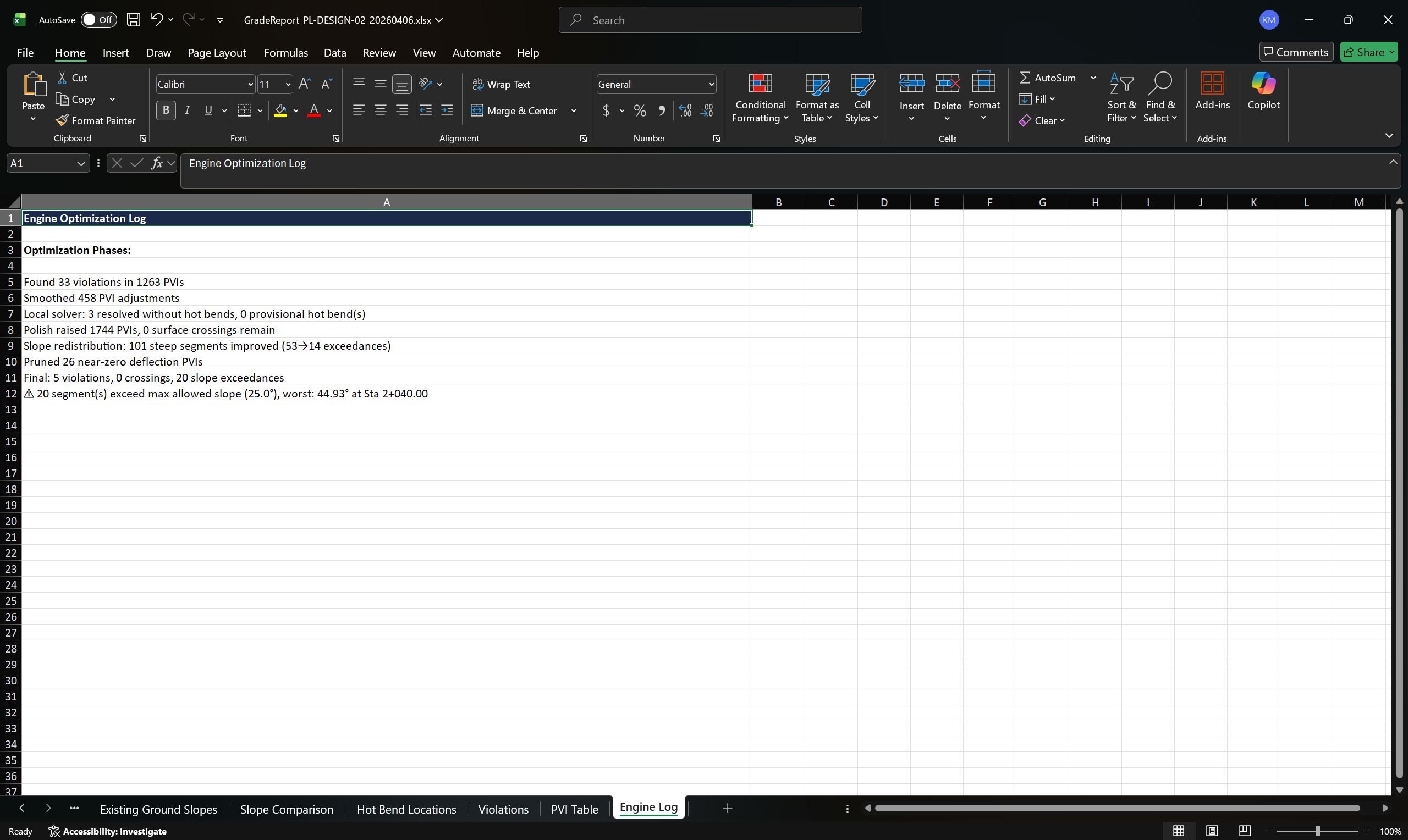
Every run produces a complete Grade Report, not a summary, but a full record of the engine's decisions. Every constraint applied, every violation resolved, every optimization pass logged. The output is built for third-party review and internal QA sign-off.
Grade Report: PL-DESIGN-02, 41 km corridor. Click any tab to explore.
Ground Level Design Inc. builds tools for the engineers who build infrastructure. We develop professional-grade software for civil engineering and linear infrastructure design, with a focus on Autodesk Civil 3D integration.
GLD Tools grew out of real project demands, major pipeline programs where grade planning had to keep pace with construction schedules, not hold them back. We needed to iterate pipe sizes, bend specs, and joint configurations quickly enough to support constructability assessments, cost-driven route selection, and permitting submissions, all before a single stake went in the ground.
Today, teams use GLD Tools across the full project lifecycle: early-stage footprint and corridor evaluation, detailed grade generation for design deliverables, construction slope and equipment access planning, and machine control-ready profile exports. The goal is the same at every phase: identify issues early, reduce rework, and minimize project costs.
Give us one real project corridor. We run it through the engine alongside your team's manual process. You keep the validated output either way. We want your honest comparison.
Book a Workflow Review →Annual licensing available. Contact for early adopter pricing.
Founder-led, no generic sales pitch. A real conversation about your projects and how the engine performs against your team's manual process.
Annual per-seat licensing. Early adopter pricing available for pilot participants.